
> Intro
> Create
• Combine (Stitch)
— Panoramas: Combine (Stitch) —
Stitch, Combine
Prints are trimmed and glued together. Digital photographs are «stitched», therefore a stitching program is needed. There are several free and commercial products available and each one works differently. There is no way around familiarising yourself with one or several of such programs. A generalised procedure cannot be given here. Stitched cylindrical or spherical panoramas can either be directly exported to a Virtual Reality (VR) movie from the stitcher or can be converted into one using an additional program.
HotSpots
Hot spots that work like weblinks can be defined in a VR panorama. With the use of
hot spots, complete interactive virtual tours can be assembled if several panoramas
are linked together appropriately.
Vignetting
The amount of light through a lens is not uniformly distributed over the whole aperture.
The light is more attenuated towards the edges than at the centre and depends on the
quality of the lens. This decrease of light towards the edges is called vignetting. Own
measurements on two zoom lenses for a DSLR camera showed a difference from the centre to
the corners of 3 dB (1 full f-stop) — which means that only half of the light intensity
at the centre appears at the corners. The stitching program must be able to compensate
for vignetting.
Chromatic Aberration
Wrong colours and artefacts created by the lens. They appear at extreme bright to dark
transitions. The flaw is more pronounced towards the edges. The picture below shows a
particularly ugly example, which is very difficult to correct manually.
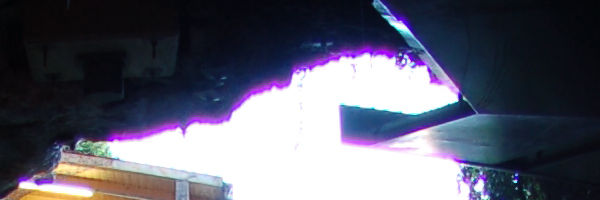
The problems are less severe if the aperture is smaller, i.e. the diaphragm more closed. Try to bring extreme contrast transitions towards the centre of the lens and use the highest f-stop possible. If the pictures are saved as RAW in the camera, the conversion program from the manufacturer can often correct these flaws (vignetting as well), if the lens is known. If an original lens was used, which one was used is written in the RAW file. The example above was saved as JPG and could not be corrected.
Stitcher Programs
I played around more or less vigorously with the Windows programs listed below (and many
more that have disapeared meanwhile). The list is by no means conclusive, there are more
programs than those listed.
- Hugin / PanoTools. Hugin is available for the Mac, PC, Linux and Unix and it is free. Hugin is quite extensive and can handle HDRI as well. The stitched panorama can be saved in 15 different projections.
- PanoramaStudio is excellent for cylindrical panoramas. The standard version costs about $40. The Pro version also stitches spherical panoramas and has a price tag of about $80.
- PTGui masters cylindrical and spherical panoramas, even Gigapanos (gigapixel panoramas made of thousands of photographs) and costs about $90, the Pro version also stitches HDRI panoramas and costs around $200. PTGui can save the stitched panorama in 13 different projections, additionally as cube faces and QTVR movie.
VR Converter
To be able to display VR movies, a display program is needed. Up to recently, Apple's
QTVR (QuickTime Virtual Reality) was the standard program. Apple has discontinued
support for QTVR. Adobe's Flash Player is one of the many alternatives, the free
DevalVR as well. The QTVR format uses a cubical panorama: the six faces of a cube.
- PanoCube for the PC converts a spherical panorama into a cubical one and is free.
- Pano2VR is available for the Mac, PC and Linux, and can do quite a lot. The standard version is around $100. With the Pro version for around $300, hot spots can be defined and very elaborate virtual tours can be created, even sound can be added.
- MovTweak is not a converter but rather a little helper to change the size of how the QTVR movie is displayed
© 2004 - 2018 by Horo Wernli.